A practical guide to making a site more readable for people and for search engines
Before we start
SEO can feel like an endless subject: keywords, content, technique, performance, data, links, reputation, algorithm updates and a thousand conflicting opinions.
This guide does not try to compress all of SEO into one page. That would be impossible, and not much use either. The goal is more concrete: to build a solid technical foundation so you know what to check when you publish a site, a page, a tutorial or a small front-end project.
If you are starting from scratch, you will find the essentials here. If you already know some of it, this guide should help you put it back in order: what really counts, what is only a supporting signal, what guarantees nothing, and what simply avoids mistakes that are trivial but costly.
The honest promise is not “you will rank first on Google”. The honest promise is: after this guide you will know how to publish pages that are clearer, easier to control and less confusing for browsers, users, crawlers and Search Console.

1. What technical SEO is
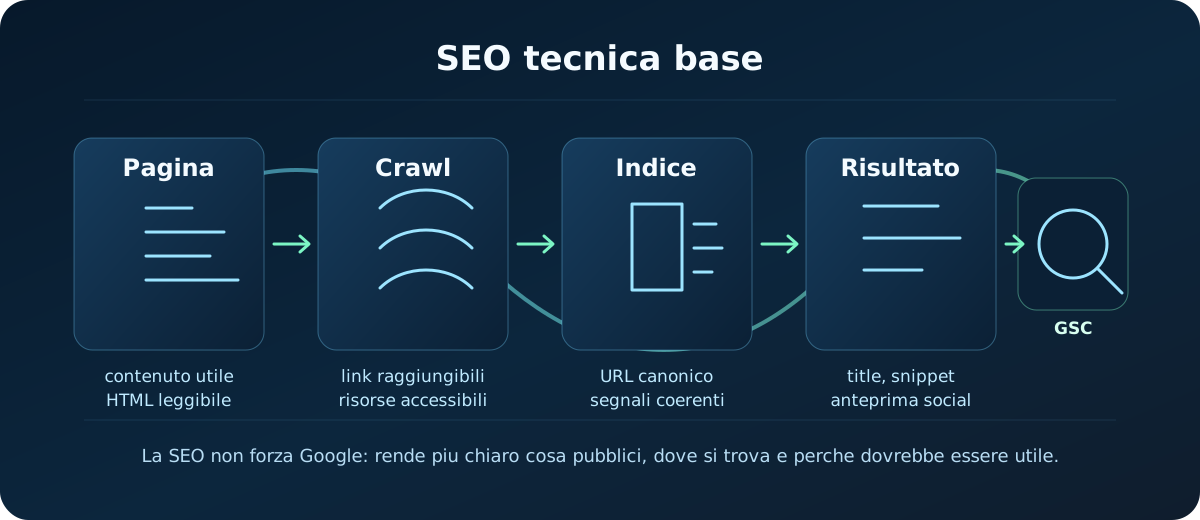
Technical SEO is the part of SEO concerned with making a site accessible, understandable and monitorable by search engines.
It is not magic. It is not a trick. It does not replace useful content, real experience, editorial clarity or the quality of the project.
Put practically, technical SEO answers questions like:
- does this page really exist online and respond correctly?
- can Google reach it through links or the sitemap?
- is the main content readable in the HTML?
- do the title, description, H1 and URL all tell the same story?
- is the right page the canonical one, or are there confusing duplicates?
- is the mobile version usable?
- is Search Console reporting crawling or indexing problems?
Technical SEO is not about forcing a search engine's hand. It is about not putting obstacles in its way and giving consistent signals.
The point to remember
A page can be technically perfect and still rank poorly if the content does not answer a real search, if it is shallow, if it copies things already everywhere, or if it offers no value.
At the same time, a useful page can lose opportunities if it has a confusing title, broken links, the wrong canonical, an out-of-date sitemap, content that loads badly or obvious mobile problems.
So technical SEO is a foundation: it does not win on its own, but it makes it possible to work better on everything else.
2. How Google thinks: crawl, index, result
To avoid getting lost, start from the simplest mental model. Google Search works in three broad phases: discovery and crawling, indexing, and serving results.
- Crawling: Googlebot discovers URLs and downloads resources such as HTML, images, CSS and scripts when it can reach them.
- Indexing: Google analyses the page and tries to work out its content, structure, technical signals and representative URL.
- Serving: when someone searches for something, Google picks the results it considers relevant and shows them with a title link, a snippet and other elements.
Not every page reaches every phase. A page can be online but undiscovered, discovered but not indexed, indexed but rarely shown, or shown with a title different from the one you expected.
This distinction is fundamental: when something is not working, you have to work out which phase it breaks in.
Asking the right question changes everything
Instead of just saying “Google can't find me”, try asking:
- does the URL respond with a 200 status?
- are there internal links pointing to that page?
- is the page in the sitemap?
- is robots.txt or a meta robots tag blocking something?
- does Search Console see the page as indexable?
- is the main content genuinely present and understandable?
That is already good technical SEO: not guessing, but isolating the point in the flow.
3. Content and intent: the technical part starts here
Before the tags, the sitemap and the structured data, you need a page that knows what it wants to do.
A strong page has one clear main topic. It does not have to cover everything. It has to help a person resolve a doubt, choose, learn, compare or complete an action.
For a technical guide, for instance, the intent might be:
- understanding a basic concept;
- following a procedure;
- avoiding common mistakes;
- having a reusable checklist;
- finding your way among similar tools.
If the intent is muddled, the technical signals get muddled too. The title promises one thing, the H1 says another, the description tries to sell everything, and the content never actually closes the need.
A simple structure that works
To get started, think of every page as a small, organised answer:
- H1: states the main topic without contortions.
- Introduction: explains who the page is for and what problem it solves.
- H2 sections: break up the steps or the important sub-topics.
- Examples: make the content applicable, not just theoretical.
- Checklist or summary: helps whoever needs to act right away.
This structure helps people, but it also helps crawlers understand hierarchy and context.
4. The essential HTML head
The <head> section is invisible on the page, but it holds important signals. At the start you do not need to stuff it: you need to get a few elements right.
<title>Technical SEO basics without panic | Practical guide | Codedge</title>
<meta name="description" content="An essential guide to technical SEO: title, description, URLs, content, internal links, sitemap, robots.txt, canonical, performance, structured data and Search Console.">
<link rel="canonical" href="https://codedge.it/en/tutorials/technical-seo-basics/">
<meta name="viewport" content="width=device-width,initial-scale=1">
This small block does not solve everything, but it creates a clean foundation.
Title
The <title> is one of the main signals used to understand and display a page in results. It should be descriptive, specific and consistent with the visible content.
Technical SEO basics without panic | Practical guide | CodedgeDeployment basics: build, hosting and domain | Codedge
HomeNew articleSEO SEO SEO complete best free SEO guide 2026
You do not need to count characters obsessively. You need to avoid titles that are vague, inflated, duplicated or disconnected from the page.
Meta description
The meta description is not a magic wand for ranking. It mainly summarises the page, and it can be used as the snippet in results, although Google may rewrite it when it thinks something else is more useful.
A good description says what the user will find and why they should open the page. It should not repeat keywords at random.
<meta name="description" content="A practical guide to Git from scratch: commits, branches, merges, remotes and recovering from mistakes without panic.">H1 and title are not the same thing
The title lives in the browser and in the page's signals. The H1 is the main heading visible in the content.
They can be similar, but they do not have to be identical. What matters is that they describe the same page.
- Title:
Technical SEO basics without panic | Practical guide | Codedge - H1:
Technical SEO basics
That is consistent: one is fuller for the search result, the other is leaner for the page itself.
5. Clean URLs and internal links
A good URL does not need to be creative. It needs to be stable, readable and consistent with the page.
/en/tutorials/technical-seo-basics//en/tools/image-compressor//en/resources/css-glossary/
/post?id=123&cat=9/new-page-final-real//technical_seo_basics_definitive2/
Do not change URLs without a reason. Every change can create broken old links, redirects to manage and signals to rebuild.
Internal links: the map people actually use
The sitemap helps, but internal links remain fundamental. If an important page is not linked from anywhere, you are telling the site itself that the page is isolated.
A good internal link has three qualities:
- it uses a real
<a href="...">element; - its text makes sense, not just “click here”;
- it connects pages that belong on the same path.
For example: linking a technical SEO tutorial from a deployment one makes sense, because once you publish, it is time to check the sitemap, Search Console and the page preview.
Practical anchor text
The link text should explain where it leads.
<a href="/en/tutorials/deployment-basics/">Deployment basics</a><a href="/en/tutorials/github-in-practice/">GitHub in practice</a>
<a href="/en/tutorials/deployment-basics/">read here</a><a href="/en/tutorials/github-in-practice/">interesting page</a>
6. Sitemap, robots.txt and noindex
XML sitemap
A sitemap is a file listing the URLs you want search engines to discover. It does not guarantee indexing, but it is a useful signal, especially as a site grows or when some pages are new.
<?xml version="1.0" encoding="UTF-8"?>
<urlset xmlns="http://www.sitemaps.org/schemas/sitemap/0.9">
  <url>
    <loc>https://codedge.it/en/tutorials/technical-seo-basics/</loc>
    <lastmod>2026-06-25T00:00:00.000Z</lastmod>
    <priority>0.7</priority>
  </url>
</urlset>
The most important part: put canonical, indexable, public URLs in the sitemap. Do not use it as a dumping ground for every possible URL.
robots.txt
robots.txt tells crawlers which paths they may or may not crawl. It is mainly for managing crawling, not for hiding private information.
User-agent: *
Allow: /

Sitemap: https://codedge.it/sitemap.xml
A classic mistake: using robots.txt to remove a page from Google. It is the wrong tool. If a page must not be indexed, use noindex, or genuinely protect it if it holds private data.
noindex
noindex tells search engines not to index a page.
<meta name="robots" content="noindex,follow">Use it for technical pages, intentional duplicates, internal pages that are no use in search, or temporary content. Do not use it on pages you want to rank.
Careful: if you block a page via robots.txt, Google may never read the noindex meta tag inside it. The signals have to be chosen coherently.
7. Canonical and duplicates
The canonical tag indicates which URL you consider the main version of a piece of content.
<link rel="canonical" href="https://codedge.it/en/tutorials/technical-seo-basics/">This is useful when identical or very similar content can be reached from several URLs.
Common examples:
/en/tutorials/technical-seo-basics/and/en/tutorials/technical-seo-basics/index.html;- versions carrying tracking parameters;
- pages filtered or sorted differently;
- HTTP and HTTPS, with or without
www, when they are not handled properly.
The canonical is not an absolute instruction: it is a signal. Google can choose a different canonical if the overall signals are inconsistent.
A simple rule
- every important page should have an absolute, consistent canonical;
- the sitemap should contain those same canonical URLs;
- internal links should point at the canonical version;
- redirects, canonicals and the sitemap should not tell different stories.
When those signals line up, you make it much easier to tell which URL actually counts.
8. Images, mobile and performance
Images
Images are not just decoration. They can weigh a page down, improve how the content is understood, or cause problems when handled badly.
A good baseline:
- use compressed images at sensible dimensions;
- add
widthandheightwhere you can; - use
loading="lazy"on non-critical images; - write useful alt text when the image carries information;
- leave
alt=""only for purely decorative images.
<img
  src="/images/tutorial/schema-seo.svg"
  alt="Diagram of the SEO steps: crawl, index and result"
  loading="lazy"
  decoding="async"
  width="1200"
  height="520">
Mobile
You can no longer treat mobile as a secondary version. If a page is unmanageable on a phone, you have a real problem: for users, for conversions, for readability and for quality control.
Check at least:
- text readable without zooming;
- buttons and links easy to tap;
- a layout that does not spill off the screen;
- images that do not crush the content;
- a usable header, menu and footer.
Performance
Performance is not just a number from a tool. It is experience: how quickly the page becomes readable, stable and usable.
For a practical baseline, concentrate on a few things:
- optimised images;
- CSS and JavaScript that are not needlessly heavy;
- fonts loaded deliberately;
- no obvious layout shift;
- real checks on mobile, not only desktop.
You do not need to chase a perfect score in every situation. You need to know whether the page is fast and stable enough to be used well.
9. Structured data and social previews
Structured data
Structured data helps describe the type of content more explicitly: article, product, FAQ, organisation, breadcrumb, recipe, course and so on.
It should not be added at random. It has to represent content genuinely present on the page.
For most sites, the most practical format is JSON-LD:
<script type="application/ld+json">
{
  "@context": "https://schema.org",
  "@type": "TechArticle",
  "headline": "Technical SEO basics without panic",
  "description": "An essential guide to technical SEO for static sites and front-end projects.",
  "author": {
    "@type": "Person",
    "name": "Alessandro"
  }
}
</script>
This guarantees no special treatment in the SERP, but it makes the content more explicit where the markup is supported and consistent.
Open Graph and Twitter cards
Open Graph is not “Google SEO” in the strict sense. It mainly controls how a page looks when it is shared on social networks, chat apps and platforms that generate previews.
<meta property="og:title" content="Technical SEO basics without panic">
<meta property="og:description" content="An essential guide to genuinely useful technical SEO.">
<meta property="og:url" content="https://codedge.it/en/tutorials/technical-seo-basics/">
<meta property="og:image" content="https://codedge.it/og/opengraph-1200x630.jpg">
<meta name="twitter:card" content="summary_large_image">
For a well-kept site these previews matter: they do not improve ranking by themselves, but they improve the presentation when a link travels outside the site.
10. Search Console: the panel that tells you what is happening
Google Search Console is an essential tool for anyone publishing indexable content. It is not only for when you have traffic: it is also for when you are learning how Google sees your site.
At the start, the most useful areas are:
- Sitemaps: you submit the sitemap and check whether Google can read it.
- URL Inspection: you check a specific page, its indexed version and its live version.
- Page indexing: you see which pages are indexed, which are excluded and the main reasons why.
- Performance: you learn about queries, impressions, clicks, CTR and average position.
Do not look at Search Console as a judge to fear. Look at it as a dashboard: it does not solve problems by itself, but it shows you signals you would otherwise only be guessing at.
A minimal routine
- Publish the page.
- Check that it responds online with the correct canonical URL.
- Check that it is in the sitemap if it should be indexed.
- Submit or refresh the sitemap in Search Console.
- Inspect the main URL.
- After a few days, check whether impressions, errors or exclusion reasons appear.
Remember: submitting a sitemap or requesting a crawl does not guarantee immediate indexing. It is a signal, not a contract.
11. Final checklist before and after deploying
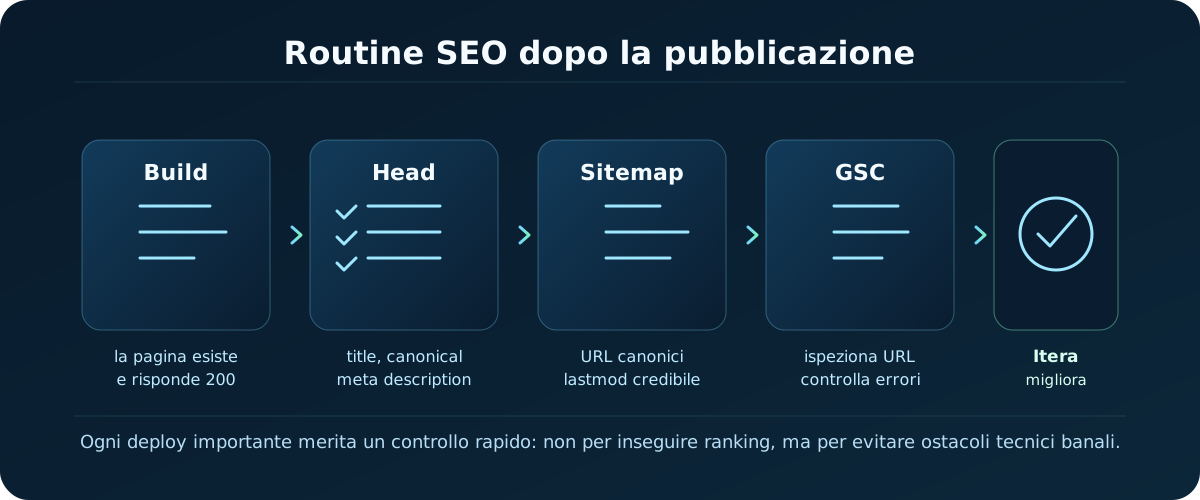
Before deploying
- the page has one clear main topic;
- title, H1 and description are consistent;
- the URL is clean and stable;
- internal links point to the new page;
- the page is usable on mobile;
- images and assets are optimised;
- an absolute canonical is present and correct;
- there are no accidental
noindextags; - the build passes without errors.
After deploying
- the public URL responds correctly;
- the sitemap includes the page if it should be indexed;
robots.txtpoints at the sitemap;- Open Graph and the social preview make sense;
- Search Console can read the sitemap;
- URL Inspection shows no obvious blocks;
- there are no internal 404s or missing assets;
- after a few days you check impressions, queries and any exclusions.
Mistakes to avoid
- changing URLs often with no redirects;
- putting everything in the sitemap, including noindex or duplicate pages;
- blocking important pages with robots.txt;
- writing titles that do not match the real content;
- using structured data that promises content which is not there;
- checking only desktop and forgetting mobile;
- expecting Search Console to update everything in real time.
Where to go from here
If you have understood this foundation, you already have an enormous advantage: you stop seeing SEO as a list of tricks and start seeing it as technical quality, editorial clarity and control after publishing.
The next step might be going deeper into content, keyword research, accessibility, advanced performance, specific structured data or Search Console analysis. But without this foundation, everything else stays more fragile.
To carry on, these guides fit together well:
- Deployment basics: to understand builds, hosting, domains and publishing.
- Web accessibility basics: to make pages and components more usable through semantic HTML, focus, keyboard, forms and contrast.
- Browsers and DevTools: to inspect the network, the DOM, the console and the assets that load.
- NPM, Vite and project structure: to understand builds, folders and the local workflow.
- GitHub in practice: for repositories, automatic deployments and control over the published project.
- All tutorials: to follow the other content available.
Useful sources when you want to go further: Google's SEO Starter Guide, Google's sitemap documentation, Google's robots.txt guide and the introduction to Search Console.
12. Quick reference (cheat sheet)
Here is a recap of the most important SEO meta tags to fill in on every page:
| Tag / File | Syntax | Useful SEO advice |
|---|---|---|
| <title> | <title>Page title | Codedge</title> | Keep it under 60 characters and put the main keyword near the front. |
| meta description | <meta name="description" content="..."> | 155-160 characters maximum. It should summarise the content attractively enough to earn the click. |
| canonical | <link rel="canonical" href="..."> | Declares the preferred official URL, which avoids problems caused by duplicate content. |
| robots.txt | User-agent: * Disallow: /admin/ | Gives search engines rules about which areas of the site not to crawl. |
13. Practical challenge: put yourself to the test
Optimise your first real HTML file by applying the technical SEO rules:
Write the right SEO tags in your site's head and set up a robots.txt that excludes private files and folders.
Step-by-step instructions:- Open an HTML file in your editor and add a canonical tag pointing at the page's official URL.
- Add a
<meta name="description" ...>tag containing an appealing summary of exactly 150 characters. - Create a text file called
robots.txtin the project's root folder. - Inside robots.txt, write the rules that allow every bot in but forbid crawling of the admin folder
/private/.
14. Check what you have learned (quiz)
Test what you have learned in this guide with a quick 10-question multiple-choice quiz.